FNF Bunzo Test
Make Bunzo Bunny Beep and Boop Online
Browser playable
Embed available; full test pending
Source
Source attribution pending
Device notes
No download; play in browser
Table of Contents
Trending now

If you enjoyed FNF Bunzo Test, try these next

FNF Bunzo Test: Make Bunzo Bunny Beep and Boop Online
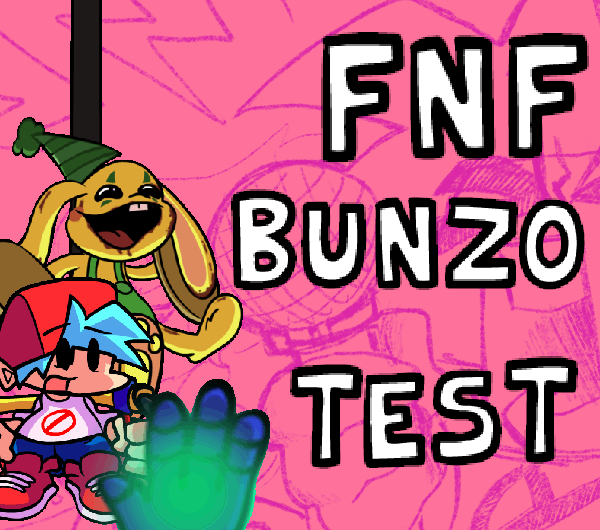
FNF Bunzo Test is a browser playable sound toy starring Bunzo, the creepy little rabbit from Poppy Playtime's Playtime Co. factory. If you played the Vs. Bunzo Poppy FunkTime mod you already know this guy — he's the one with the cymbals from the Muscle Memory week, originally created by modder richilix on GameBanana. Bot Studio took that concept and turned it into a standalone interactive experience you can fire up right here without touching a download. The whole point is creative musical chaos. You aren't hitting notes on a scroll lane or trying to survive a hard mode week. You tap arrow keys and Bunzo responds with different beeps and bops — each key produces its own sound, and the space bar triggers a special effect. Hold keys down and Bunzo strikes a pose, which adds a weirdly charming visual layer to the noise you're making. It's less of a traditional FNF mod and more of a digital rhythm toy, the kind of thing you'd expect to find on a tablet app for kids. That said, the character model looks fantastic — the slightly unsettling grin, the floppy ears, the cymbal-clapping animation all translate perfectly from the original mod. The embed runs smooth in any modern browser, and there's a touch toggle if you want to mess around on a phone or tablet. If you go in expecting a full song list and competitive scoring you might be let down, but as a quick creative break or something to hand a younger sibling, FNF Bunzo Test absolutely delivers. It's also a cool piece of FNF history — a snapshot of one of the community's weirder crossover experiments between Friday Night Funkin' and the Poppy Playtime universe.
If you enjoy music, you'll love our full library of free online music games — all playable instantly in your browser, no downloads needed.
Did You Know?
Bunzo is one of the toy mascots from Poppy Playtime Chapter 2, manufactured by the fictional Playtime Co. factory. He's a rabbit with built-in cymbals designed to clap together, and in the official game he appears in a musical memory mini-game where players must repeat color sequences or face him hunting them through the factory vents. The FNF community latched onto his design immediately — that eerie grin mixed with the almost cute rabbit proportions made him perfect fan mod material.
Key Features
Why You'll Love It
If you're a fan of pick-up-and-play games that respect your time, FNF Bunzo Test is tailor-made for you. It's perfect for those moments when you want quick, satisfying fun without a steep learning curve — offering a refreshing blend of simplicity and addictive gameplay. The easy-to-learn controls and instant action ensure you're always just one click away from a great time.
How to Play FNF Bunzo Test
Controls are dead simple. You've got four arrow keys — up, down, left, right — and each one makes Bunzo produce a different sound. It's not mapped to a chart or tied to any song; you're basically freestyling with whatever the arrow keys trigger. The space bar throws in a special sound effect on top of whatever else is playing, which lets you layer things up if your timing is good. On mobile, tap the touch toggle button in the corner of the screen and a D-pad overlay pops up so you can tap sounds with your thumbs. No keyboard required.The real hook is the creative freedom. There's no fail state, no health bar, no scoring system breathing down your neck. You hold an arrow key and Bunzo locks into a pose — arms out, head tilted, cymbals ready — which turns the whole thing into a little performance rather than a test of reflexes. Try stringing together rapid taps with held poses for a call-and-response feel, or just mash keys and enjoy the accidental melodies that come out. It's the kind of low pressure toy where ten minutes can slip by before you realize you've been making a toy rabbit dance the whole time.
Disclaimer: These are the standard controls for this type of game on PC Browser with Keyboard/Mouse. The actual controls may be slightly different.
| Action / Purpose | Key(s) / Gesture |
|---|---|
| Arrow keys | play sounds. Space for special sound. Hold keys to strike poses. Toggle touch controls in-game for mobile. |
Tips & Tricks
Time your poses to land on the beat. Holding a key right after tapping it creates a syncopated call-and-response effect that sounds way more intentional than random mashing. The visual feedback from Bunzo's pose animation helps you lock into a groove.
Experiment with arrow key combos by rolling your fingers across all four directions. Some sequences of sounds naturally feel like little melodies when played in order, and you'll stumble onto patterns that genuinely sound like they belong in an FNF track.
On mobile, turn on the touch toggle and use both thumbs. The D-pad is big enough that you won't fat-finger the wrong direction, and the space bar button sits right above it within easy reach. Landscape orientation gives you the most comfortable grip.
The space bar special sound layers on top of whatever arrow key sound is currently playing. Try holding an arrow key to sustain one sound while tapping space bar at different intervals — it creates a drone-plus-percussion texture that's weirdly satisfying.
Why Play Here?
Instant Browser Play
No download, no install, no launcher. The game loads in seconds and runs directly in your browser tab. Close it and your computer is exactly how you left it — no leftover files or background processes to worry about.
Mobile Friendly
Touch controls are built in with a toggleable D-pad overlay. It works on phones and tablets without any extra configuration, and the interface is thumb-friendly enough that even smaller screens feel usable.
Creative Freedom
There's no score, no fail condition, and no wrong way to play. You control every sound Bunzo makes, which turns it into a musical sandbox rather than a competitive rhythm game. Great for unwinding or just making noise for the fun of it.
Official Bot Studio Port
This is Bot Studio's official browser port of the Bunzo test concept, based on richilix's original GameBanana mod. You're playing a version the devs actually put together for web distribution, not a sketchy third party reupload.
Looking for more music games? Browse our full catalog →
Play FNF Bunzo Test on Mobile & Chromebook
Want to play FNF Bunzo Test on your phone or school Chromebook? Good news — FNF Bunzo Test runs directly in your mobile browser with no download, no app store, and no installation required. Just tap the "Play Now" button above and the game loads instantly.
📱 Mobile (iPhone / Android)
Open this page in Safari or Chrome on your phone. Tap "Play Now" — the game adapts to touch controls automatically. Works on iOS and Android.
💻 Chromebook / School Laptop
No admin permissions needed. Just open Chrome, visit this page, and play. Zero installs, zero blocks — the game runs right in the browser tab.
Tip: For the best experience, use landscape mode on mobile and close other tabs to free up memory. FNF Bunzo Test is optimized to run smoothly even on older devices.
Frequently Asked Questions
Discuss: FNF Bunzo Test
ok this is adorable. bunzo making beep boop sounds while i spam arrow keys is way more fun than it has any right to be. the pose system is a nice touch too
solid sound toy but wish there were more tracks or a proper rhythm mode. the creepy-cute bunzo design is perfect though, exactly what you'd expect from a poppy playtime crossover
my little brother loves this lol. no fail state means he can just mash buttons and make funny sounds. the hold-to-pose thing cracks him up every time